Showing posts with label HTML. Show all posts

10/28/2017

How To Use The Object-Fit Property With CSS To Center And Crop An Image

No comments:
How To Use The Object-Fit Property With CSS To Center And Crop An Image For Mobile Responsiveness - Jefferson Memorial

Have you ever wanted to use simple code to crop an image and focus on a specific section of that image without having it stretch or compress? Today I'm going to show you how to achieve that with a quick tutorial using the Object-Fit Property with CSS!

5/06/2017

How To Crop An Image Using The CSS Clip Property

No comments:
How To Crop An Image Using The CSS Clip Property

Have you ever wanted to crop one of your images and focus on just a section of it without editing it in Photoshop? Sure it doesn't take long using the Adobe software, but what if you could do it even quicker with code? I'll show you how! With this basic tutorial, I will show you how to crop any image using the CSS clip property. Let's begin.

9/24/2015

How To Use The < summary > And < details > Tags To Make An Interactive Cheeseburger With HTML / CSS

No comments:
How To Use The <summary> And <details> Tags To Make An Interactive Cheeseburger With HMTL CSS

Getting creative with code can be a lot of fun, so I decided to use the <summary> and <details> tags to create an expandable and collapsable menu in the form of a Cheeseburger. Who doesn't enjoy cheeseburgers?!? To tackle this project I used basic HTML table elements for the layout and the summary / details tags for the menu. Using these tags allows information to be revealed and hidden at the click of a button!

The HTML code to create this is very basic. The more involved coding is the CSS, to make it look like a cheeseburger.

The tags themselves may not be supported by all browsers, if you'd like to see the current support status, visit W3Schools: details / summary.

9/15/2015

How To Create A Simple HTML Horizontal Navigation Bar Styled With CSS

No comments:
How To Create A Simple Horizontal HTML Navigation Bar Styled With CSS

In this tutorial I will walk you through creating a simple Navigation Menu Bar with HTML and CSS for your website (as shown in the image above). If you're in need of a basic navigation menu at the top of your blog just follow along with these basic steps below, to create your very own!

12/12/2014

How To Create A Weekly Agenda Styled With CSS Using The Rotate Transform And Transition Properties

No comments:
How To Create A Weekly Agenda Styled With CSS Using The Rotate Transform And Transition Properties

As I learn more about what can be done with coding, the more fun it becomes. With this project I decided to create a weekly agenda with HTML and CSS that used the rotate transform and transition properties of CSS3. These specific functions are used to spin and show a larger block with text upon mouseover. More specifically, when you hover your mouse over a day of the week, the small tile will rotate 180 degrees and show the information on the back within a larger tile.

*For now, I still have some bugs to work out and this agenda does not work correctly in Safari, but it does work great in Chrome and Firefox.

12/11/2014

How To Create A Fancy HTML Calendar Styled With CSS That Uses Hover Enlarge To Expand The Days Of The Week On Mouseover

No comments:
How To Create A Fancy HTML Calendar Styled With CSS That Uses Hover Enlarge To Expand The Days Of The Week On Mouseover

I have created a basic HTML and somewhat fancy (in my opinion) calendar that I styled with CSS and uses hover enlarge to expand the days of the week when you mouseover them! Below I have them demo for you to try out! After that I have the HTML and CSS code. Let me know your thoughts on this by leaving a comment below and feel free to make improvements on this code!

*Note that this calendar does not work correctly in Safari. I have some bugs to work out.

12/07/2014

How To Create A Simple HTML Scroll Box For Your Images

No comments:
How To Create A Simple HTML Scroll Box For Your Images

If you're looking for a quick and simple way to create a scrolling box for your images, check out this simple tutorial.

Below is the demo I have created of a basic scroll box in HTML, which will allow you to scroll from top to bottom with your mouse to see the images contained inside the area. Let's check out the demo and code!

3/09/2014

How To Create A Simple Image Hover Rollover Link Using The Javascript Onmouseover Event And Basic HTML

No comments:
How To Create A Simple Image Hover Rollover Link Using The Javascript Onmouseover Event And Basic HTML

In this tutorial I will walk you through creating a simple, clickable image that uses the Javascript onmouseover event to change that image when you hover over it with your mouse. For the demo I created a small banner with my Robot Digital Concept Illustration that I previously used to link to the artwork section of my website. You can view all of my illustrations here! And if you're ready to get started, let's get to the tut!

2/19/2014

How To Optimize Images With Title And Alt Attributes To Improve SEO For Better Search Engine Results

No comments:
How To Optimize Images With Title And Alt Attributes To Improve SEO For Better Search Engine Results

If you're blogging or creating a website full of images, chances are you want to optimize those images for search engines a.k.a Search Engine Optimization. I'm going to run through a simple tutorial on how to use the ALT and TITLE attributes properly with your images and basic rules for great image SEO! You'll need a little patience, a computer, an image to post and hands at the ready to type out HTML code. Don't stress, this tutorial is very simple and full of useful tips!

8/28/2013

How To Create A Fancy HTML Table Styled With CSS Using The Basic Hover Selector Function

No comments:
How To Create A Fancy HTML Table Styled With CSS Using The Basic Hover Selector Function

In this tutorial, I will show you how to create a fancy HTML and CSS table! If you're new to coding and need to start with the basics, check out this project first: How To Create A Simple HTML Table. If you're interested in viewing calendars created in code, check out these calendar projects here. Otherwise let's check out the demo and code below!

How To Create A Smooth HTML Calendar Styled With CSS

1 comment:
How To Create A Smooth HTML Calendar Styled With CSS

This is a smooth HTML calendar styled with CSS that uses a simple hover effect upon mouseover. In this tutorial I will show you how to create your very own calendar! Let's jump right into it and start with interacting with the demo below. You'll notice as you hover your mouse over the different rows, it highlights that row with a black background and lime green text.

HTML Calendar With Inline CSS Styles

No comments:
HTML Calendar With Inline CSS Styles

If you're interested in creating a basic HTML calendar with Inline CSS you've come to the right place! While inline styling is not the most practical way to code it's good to learn and has it's uses. You'll find the code below that you can either copy and paste as is or use as a template to create your own calendar. Enjoy!

If you'd like to learn how to create a basic calendar, read through my step by step guide tutorial: How To Create A Simple Calendar Using HTML!

How To Create A Simple Calendar Using HTML

2 comments:

How To Create A Simple Basic Calendar Using HTML By Justin Woodie Tutorial


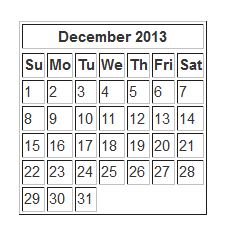
Calendars are a necessary part of our everyday life, they help us stay organized, focused and on top of tasks we need to complete each day. So why not make one with HTML? It's fun and simple. In this tutorial I'll show you how to create a very basic calendar using HTML Tables!

If you'd like to read some basic on HTML Tables read my How To Create A Basic Table Using HTML tutorial!

If you're ready let's go!

How To Create A Simple HTML Table

No comments:
How To Create A Simple HTML Table

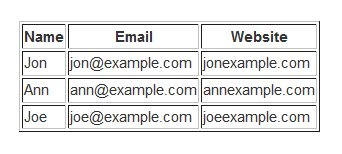
In this tutorial I will show you how to create a basic table using only HTML elements, tags and attributes.

So...What are all those things?

An HTML Element defines the structure of what we are creating, in this tutorial the <table></table> tags and the coding that will be placed in between, create our Table Element.

An HTML Tag represents the beginning and end of an HTML Element. For example the <table> tag in the previous sentence combined with it's closing </table> tag defines the start of our element, which will be a table!

An HTML Attribute defines a specific property of an element or more specifically a single tag, basically telling the tag it's incorporated with, to fulfill a certain task; such as creating a border. For example the beginning table looks like this: <table border="1">. You'll notice the added word border inside the tag. The number 1 defines the thickness of the tables border.

In brief:

<table> represents an example of a single tag.

<table> (content coding goes here) </table> defines our element.

<table border="1"> represents a tag with an attribute.

Before we begin let me start by defining what a table is and what it is used for. A table is a gridded structure of rows and columns used to hold and organize information. They are Not used to layout and create websites with, even though tables can be made to look quite good and very fancy.

Where do you type out your code?

A great place to write coding is in a text document using notepad on Windows or if you'd prefer to see a live preview of your work visit and type out the coding in the window on the left and see the preview on the right!

Without further ado, let's being!

Tic - Tac - Toe Game

No comments:

Tic - Tac - Toe HTML Game


Tic Tac Toe

Your browser does not support the HTML5 canvas tag.


I was fortunate enough to come across an excellent tutorial on that walked me through creating a simple Tic-Tac-Toe game using HTML5, Javascript and CSS. Go ahead and play it, it's fun! I spiced it up with color and smoothed out it's overall look. It was a lot of fun and I'm continuing to understand all the functions inside the coding. If you want to make your own version, I highly recommend !

I plan on playing with the code and tweaking the look and feel of the game as I learn more. Any thoughts, suggestions, comments and critiques are welcome!

*This game uses HTML5 and does not work on Internet Explorer. Best viewed with FireFox, Chrome and Safari!


Copyright © justinwoodie.com ©